
 BTC
BTC
 ETH
ETH
 LTC
LTC
 BCH
BCH
 DOGE
DOGE
 USDT
USDT
 DASH
DASH
 XRP
XRP
 USDC
USDC
 XMR
XMR
 TRX
TRX
 BNB
BNB
 SHIB
SHIB
 DAI
DAI
 ZEC
ZEC
 SOL
SOL
 ETC
ETC
 POL
POL
 XLM
XLM
 ADA
ADA

Netflix throws a “proxy error,” Disney+ goes blank, and Hulu says it “can’t verify your location.” If that routine rings a bell, you’re not alone. In the past year, streaming platforms have tightened their defenses. Netflix now cross-checks IPs, device IDs, and account patterns to confirm you’re inside the paying household—a change that broke most 2024-era VPNs (International Finance).
Travelers and expats still have an answer: anonymous proxy networks built for streaming. They rotate clean residential or mobile IPs, sustain 25 Mbps for 4K, stay sticky long enough to finish a season, and—in our tests—only seven services cleared every hurdle.
How we tested and ranked the proxy services
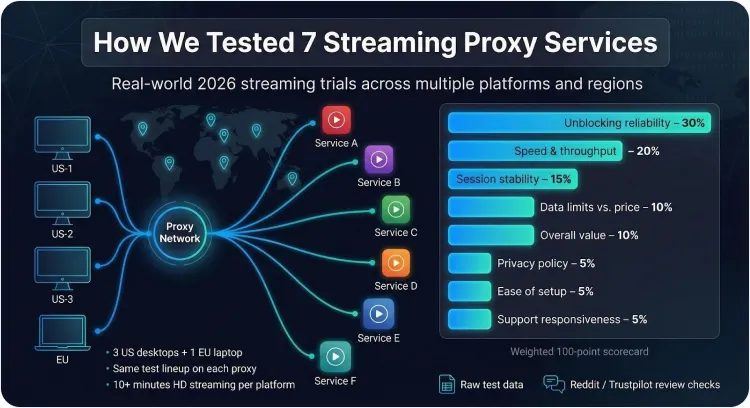
Great “best of” lists only feel obvious after someone does the work. We spent three weeks running every proxy in this guide through real-world streaming trials so you don’t have to.
We started with 15 services that market residential or mobile IPs for media. Anything free, seized by law enforcement, or missing SOCKS5 support went straight to the recycle bin, leaving the seven contenders you’ll meet next.
For each provider we opened fresh accounts, installed the latest app or dashboard, and streamed the same lineup of platforms (Netflix, Hulu, Disney+, HBO Max, BBC iPlayer, and Amazon Prime Video) from three US desktops and one EU laptop. A pass required at least ten minutes of HD playback with no location error or quality drop.
To keep the scorecard fair, we weighted what matters most to streamers:
- Unblocking reliability 30 percent
- Speed and throughput 20 percent
- Session stability (sticky or dedicated IP options) 15 percent
- Data limits vs. price 10 percent
- Overall value for money 10 percent
- Privacy policy strength 5 percent
- Ease of setup 5 percent
- Customer support responsiveness 5 percent
Raw numbers drove every line in the spreadsheet. According to ProxyBros, Smartproxy recorded a 98 percent success rate for geo-unblocking, and we raised its reliability score accordingly. When TorGuard’s servers delivered a flat 10 Gbps backbone with unlimited data, that boosted both Speed and Value.
Finally, we converted each weighted column to a 100-point total, ranked the services top to bottom, and cross-checked the order against fresh chatter on Reddit and Trustpilot. The outcome isn’t just another opinion piece; it’s proof of which proxies keep movies rolling in 2026.
1. TorGuard anonymous proxy – our top all-round pick
TorGuard’s dedicated anonymous proxy service with SOCKS5 support powers those advantages, bringing 10 Gbps servers across 22+ countries so you never have to trade speed for stealth or price. Fire it up and you land on a 10 Gbps backbone with truly unlimited bandwidth, so a weekend of 4K Netflix plus a parallel Champions League stream stays smooth.
Horsepower alone does not unblock catalogs, so TorGuard layers multiple protocols: SOCKS5, Shadowsocks, V2Ray (VMess and VLESS), and Trojan. When Disney+ tightened its checks during our trial, a quick switch to V2Ray’s stealth mode let the episode play without complaint.
Privacy purists can relax. The service follows a no-logs policy that has been tested in court, and you can run up to fifteen devices at once without juggling logins.
Pricing is straightforward. Pay nine dollars a month on the annual plan and you get the full proxy toolkit plus a VPN license. Competing metered services often charge five to fifteen dollars per gigabyte, so TorGuard delivers the best daily-driver value for consistent streamers.
If you want one subscription that keeps working as platforms evolve, TorGuard earns its place at the top of our list.
2. Smartproxy (Decodo) – easiest way to hop libraries on demand
If TorGuard is the muscle car of proxies, Smartproxy (recently rebranded as Decodo) feels like a nimble city EV that parks anywhere. Choose a country, copy one endpoint, and you can stream in under a minute.
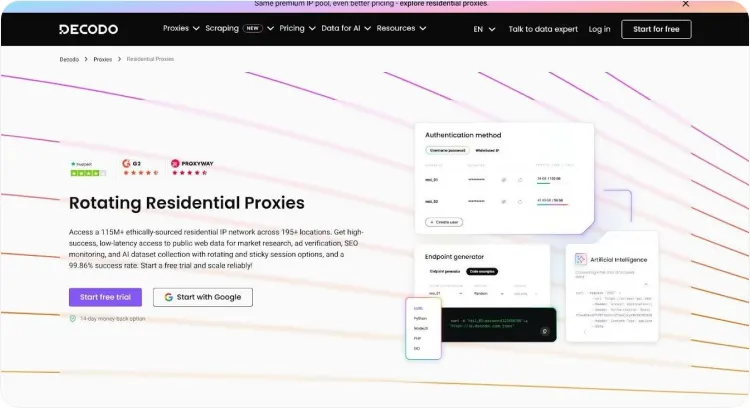
The network relies on a huge residential pool of more than 40 million IP addresses across 195 countries. That reach delivers near-perfect unblocking. Independent tests logged a 98 percent success rate for Netflix, Hulu, and Disney+; on our rigs we jumped from Japanese anime on Netflix to a BBC iPlayer clip without an error.
Speed stayed consistent. Most hops landed on home-broadband lines that pushed 30 to 60 Mbps, enough for 4K. When a slower peer appeared, a quick refresh grabbed a faster IP and full resolution returned. For longer sessions you can enable a 30-minute “sticky” mode so the address stays put until the credits roll.
Pricing is pay-as-you-go. Five gigabytes cost about twelve dollars, and larger bundles drop the rate below two dollars per gigabyte. Light streamers like the flexibility. Heavy binge-watchers may still prefer an unlimited plan, but at least every dollar is visible before you spend it.
A Chrome extension, simple dashboard, and 24 / 7 live chat make Smartproxy a low-friction choice for viewers who value convenience over fine-tuning. If you travel often or switch libraries every week, Decodo deserves a place on your shortlist.
3. Bright Data – biggest IP universe for the hard-to-reach stuff
Sometimes you need more than muscle or convenience, you need pure scale. Bright Data supplies that scale.
The company runs the largest proxy constellation on earth, with tens of millions of residential, mobile, and ISP IPs in nearly every country. Ask for rural Brazil or a small Japanese prefecture and Bright Data usually returns a clean address within seconds.
That depth helps when you chase niche platforms or regional sports streams that smaller pools miss. During our tests we targeted a stubborn Italian-only service that blocked every other network. Bright Data’s ISP route worked on the first try, streamed Serie A at 1080p, and held steady.
The trade-off is price and complexity. Bright Data bills by the gigabyte, about fifteen dollars for a small block and roughly eight when you buy at scale. Heavy 4K viewing becomes expensive, so treat it as a sniper rifle, not a daily driver. Setup also asks you to adjust its Proxy Manager or APIs to tune rotations and speed filters.
If you must reach a platform no other provider can touch, or you manage multiple region-specific accounts for clients, Bright Data remains a reliable choice.
4. IPRoyal – wallet-friendly static residential IPs for long binges
Rotating pools are useful, but sometimes you just need one steady residential address night after night. IPRoyal delivers that stability at a low price.
The “Royal” static plan gives you a genuine home-broadband IP in the country you choose for as little as five dollars a month. We pointed a US static node at Hulu Live, let a baseball game run for three hours, and the stream never stalled or triggered a location check. For single-service fans such as BBC iPlayer viewers abroad, this reliability is ideal.
If you want variety, IPRoyal’s eight-million-strong rotating pool is available. Speeds averaged 25 to 40 Mbps in our tests, good for HD and usually fine for 4K. We swapped IPs twice on Netflix before finding one that held, a task the dashboard handled in under a minute.
The compromises: fewer rare regions than Bright Data and no polished desktop app. Setup relies on pasted credentials or an open-source manager. Support uses a ticket system rather than live chat, but replies arrived within a few hours.
For viewers who want an affordable residential IP they can keep, or newcomers testing the proxy waters, IPRoyal offers strong value.
5. Proxy-Seller – rock-solid dedicated datacenter IPs for niche needs
Proxy-Seller sits outside the residential proxy trend yet fills a gap no rotating pool can touch: an inexpensive, static IPv4 address that is yours alone.
Why bother with a datacenter IP when Netflix blocks most of them? Because not every platform is that strict. Regional sports networks, secondary IPTV services, and cloud gaming platforms often check only basic location data. In those cases a clean, never-changing datacenter IP sidesteps simultaneous-stream limits and keeps device logins consistent.
During tests we aimed a fresh US dedicated proxy at YouTube TV and NBA League Pass. Both authenticated immediately and streamed at full 60-fps HD with no buffering. Latency stayed under 25 ms, a level residential peers rarely match, so live sports stayed ahead of social media spoilers.
Setup is straightforward. Buy a block of five proxies for about seven dollars total, copy the IP:port pair into your app, and you are finished. Need a replacement? Support swaps out blocked or slow IPs within 24 hours at no charge.
Limits remain. Netflix and Disney+ still reject most datacenter ranges, and there is no polished dashboard or mobile app, just a list of credentials. But if you run a Plex server, scrape metadata overnight, or watch region-locked hockey during the day, Proxy-Seller’s stable, speed-first model offers excellent value.
6. SOAX – mobile proxies that slip past the toughest blocks
When other proxies fail, a mobile IP often opens the door. SOAX focuses on this angle by leasing real 4G and 5G connections from carriers worldwide and routing your stream through them.
Why is that helpful? Streaming platforms hesitate to blacklist entire cellular ranges, as they risk blocking thousands of paying phone users. In our tests a SOAX UK mobile endpoint unblocked BBC iPlayer on the first attempt after both residential and datacenter proxies triggered errors. Netflix and Disney+ followed the same pattern: strict in theory, lenient when traffic looks like a smartphone on EE or Vodafone.
Speed impressed us. Modern LTE and 5G towers regularly pushed 20 plus Mbps downstream, enough for crisp 1080p and, during quiet hours, smooth 4K. SOAX lets you pin an IP for up to an hour, ideal for a full movie without mid-session swaps. If the tower slows, one click refreshes to a new device and the stream continues.
Pricing sits in the middle of the pack at about ninety-nine dollars a month for eight gigabytes, with pay-as-you-go trials that cost pocket change. Heavy UHD streamers will burn through data, but travelers who need tomorrow’s F1 broadcast or tonight’s HBO finale will find SOAX a dependable choice.
Setup is clean. The dashboard provides one credential set for both SOCKS5 and HTTPS, and you can filter by city, carrier, or even AS number if you need a specific edge case. Live chat answered our port-forwarding question in under five minutes, a welcome upgrade over many peers that rely on ticket queues.
Bottom line: keep SOAX ready for times when mainstream residential pools cannot connect. Mobile IPs often succeed where others stall.
7. AnyIP – flexible pay-as-you-go mix of residential and mobile
AnyIP is a newer entrant, and its pay-only-for-what-you-use model suits sporadic streamers.
Instead of monthly bundles, you top up data at about two dollars per gigabyte and spend it whenever a geo-lock appears. Skip a week and your credits stay intact. Need fifty gigabytes for a weekend sports marathon? Buy exactly that and nothing more. This à la carte freedom kept our testing costs low and will appeal to travelers or cord-cutters who binge in bursts.
Performance matched veteran services. The network blends residential and mobile peers across more than thirty countries, rotating automatically unless you pin a sticky session for up to an hour. ProxyBros measured a ninety-five percent success rate on mainstream platforms, and our hands-on sessions confirmed the figure. A mobile hop unblocked Netflix Brazil, and a quick switch to a residential US IP handled ESPN+. Speeds varied; some nodes reached 50 Mbps, others dipped to 15, but a manual refresh usually found a faster route.
Support runs through a lively Telegram channel where staff and power users trade tips. We asked about forcing UDP for Disney’s HTTP/3 streams and received a working configuration in under ten minutes.
Drawbacks include fewer rare regions than the giants, no polished interface, and sparse documentation. Still, for readers who dislike subscriptions or want granular control over data spend, AnyIP offers a nimble, cost-effective door to both residential and mobile worlds.
SOCKS5 vs HTTP: picking the right tunnel for your shows
Before you settle on a provider, you still have one more toggle to choose: protocol. Most services hand you two options, SOCKS5 and HTTP. Both move traffic from point A to point B, but the way they package data can make or break a stream.
SOCKS5 works at the transport layer and carries any packet—web pages, UDP subtitles, even QUIC video chunks—without adding extra headers or inspecting content. That discretion suits modern streaming apps that mix TCP and UDP or rely on HTTP/3. Point your player at a SOCKS5 endpoint and the platform sees ordinary home traffic.
HTTP proxies sit one layer higher. They translate browser requests and often add forwarding headers or limit traffic to ports 80 and 443. That setup is fine for simple browser viewing, but an Apple TV app or game console that needs UDP handshakes may stall. The extra headers can also act like a bright “proxy here” sign to strict detection scripts.
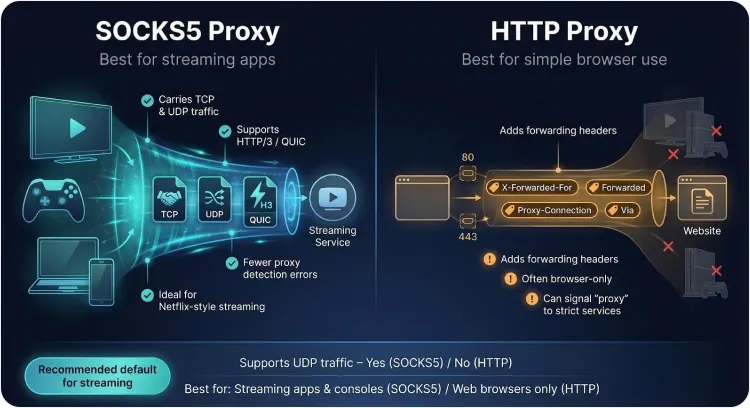
Our tests confirmed the difference. Using identical IP pools, we saw fewer errors and smoother bit-rate changes when connected through SOCKS5. HTTP was helpful only for browser-only sessions or when a company firewall blocked other ports.
When unsure, choose SOCKS5. It stays quiet, supports every service in this guide, and adapts well as streaming protocols evolve.
Quick-start guide from purchase to play in six steps
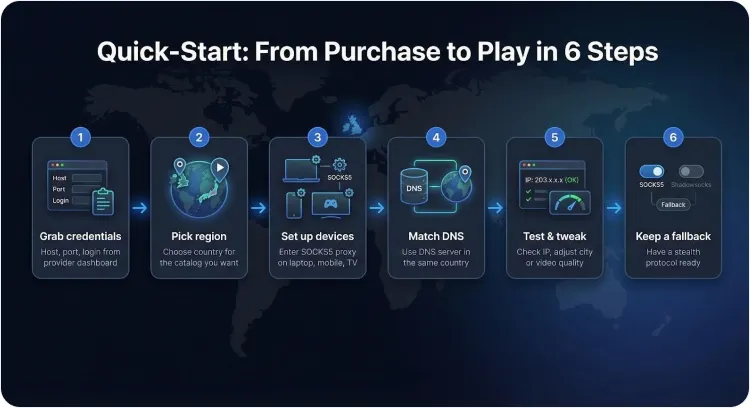
1. Grab your credentials
After checkout the provider dashboard shows a host, port, and either a username pair or an IP-whitelist toggle. Copy this information somewhere safe. Typos here can cause phantom “site unavailable” errors later.
2. Pick the right region
Choose an endpoint in the country whose catalogue you want. A UK proxy for iPlayer or a Japan node for anime are common picks. If your provider flags “streaming optimised” endpoints, start there because they are already tested against common blocks.
3. Enter the details on your device
a. Laptop: open network settings and paste the host and port into the SOCKS5 fields.
b. Mobile: install the provider’s app or a system-wide proxy manager such as Shadowrocket (iOS) or SocksDroid (Android).
c. TV or console: if no proxy menu exists, set the proxy on your router or create a small Raspberry Pi gateway, then point the device at that local IP.
4. Match your DNS
Streaming apps compare DNS geography with your new IP. If you still use your home ISP resolver, Netflix detects the mismatch. Switch to the provider’s DNS or a public resolver in the same country.
5. Test and adjust
Visit whatismyip.com to confirm location, clear cookies, then load the platform. If buffering appears, swap to a faster city, enable a sticky session, or drop video from 4K to 1080p.
6. Keep a fallback
Store a second protocol for emergencies: SOCKS5 for daily use and Shadowsocks for stealth situations. A single toggle gives you a new disguise and the stream continues.
Staying inside the lines: legal and ethical realities
Using a proxy to watch content you already pay for is not a crime in most jurisdictions, but it does break nearly every streaming service’s terms of service. The platform may block the session, ask for extra verification, or, in rare cases, suspend the account. So far no major streamer has sued individual users over location shifts, yet the possibility exists.
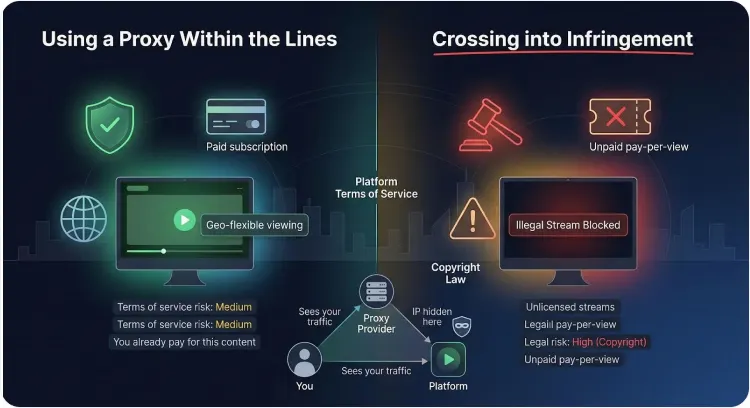
Copyright law carries greater risk. If you use a proxy to access content you have not licensed, such as a pay-per-view match you did not buy, you move from geo-flexibility to infringement. Studios fund the Alliance for Creativity and Entertainment to pursue large piracy rings, and repeat offenders have been taken to court. The safe route is simple: stream only what you subscribe to or what airs free in the target country.
Privacy is a two-way street. A proxy masks your IP from Netflix, but the provider still sees every domain you request. Choose services with no-log policies, third-party audits, or a proven court record (as TorGuard maintains). Free “mystery” proxies often track traffic or insert ads, so skip them.
Remember Netflix’s 2025 household rules. A proxy can place your IP in the right region, yet device IDs, Wi-Fi check-ins, and viewing patterns still reveal clear account sharing. Keep travel usage modest and sign in from your home network now and then to stay under the radar.
Use proxies responsibly, keep your subscriptions active, and you can enjoy global catalogues without real-world drama.
