
 English
 Français
 BTC
BTC
 ETH
ETH
 LTC
LTC
 BCH
BCH
 USDT
USDT
 DOGE
DOGE
 DASH
DASH
 USDC
USDC
 XRP
XRP
 XMR
XMR
 TRX
TRX
 BNB
BNB
 SHIB
SHIB
 SOL
SOL
 DAI
DAI
 ZEC
ZEC
 ETC
ETC
 POL
POL
 ADA
ADA
 XLM
XLM
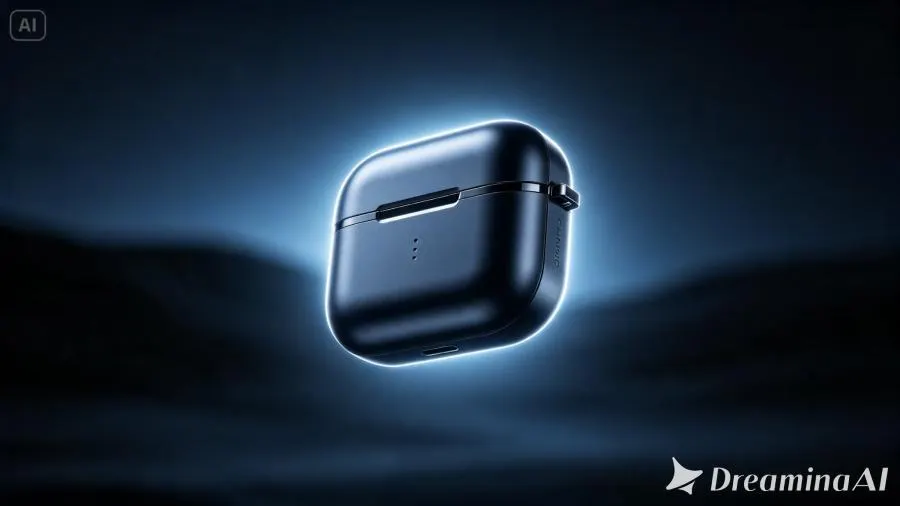
A product concept photo is usually shown before the world is ready for it — a prototype render, an early sample shot, a first look meant to build anticipation rather than close a sale. With image to video technology, that anticipation can be built far more effectively than a still image alone ever could.
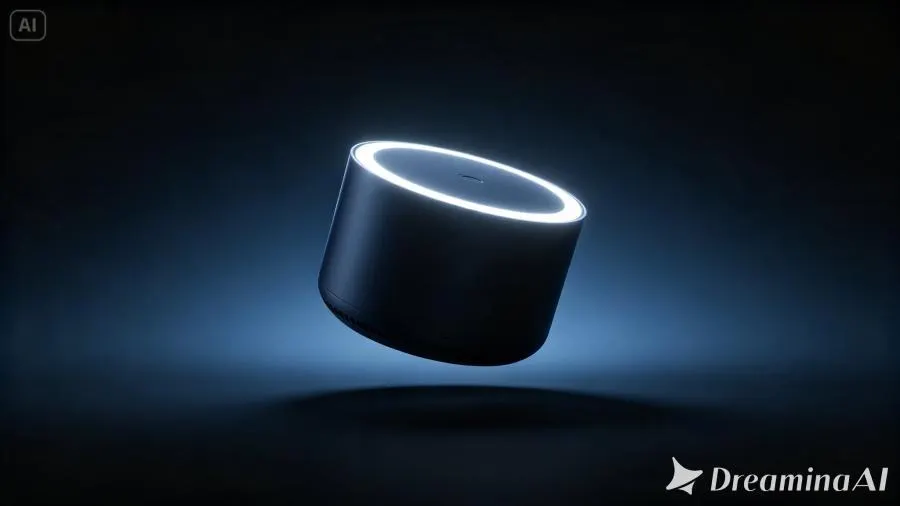
Dreamina, powered by its latest and most advanced video generation model, Seedance 2.5, turns a single concept image into a launch teaser that feels like the opening scene of something bigger.
Why teasers work better as motion than as photos
A teaser's entire job is to create curiosity without giving everything away. A still photo can hint at design, but it rarely builds the kind of suspense a moving reveal can. Motion lets a product emerge gradually — a light catching an edge, a shape slowly rotating into view — which naturally holds attention longer than a fully visible static shot ever could.
What makes a launch teaser actually effective
Not every moving clip creates real anticipation. The teasers that work tend to share a few traits:
A slow, deliberate reveal rather than showing the full product immediately
Lighting and atmosphere that suggest exclusivity or innovation
A closing moment that leaves just enough unanswered
Building your teaser: a fun 3-step reveal with Dreamina
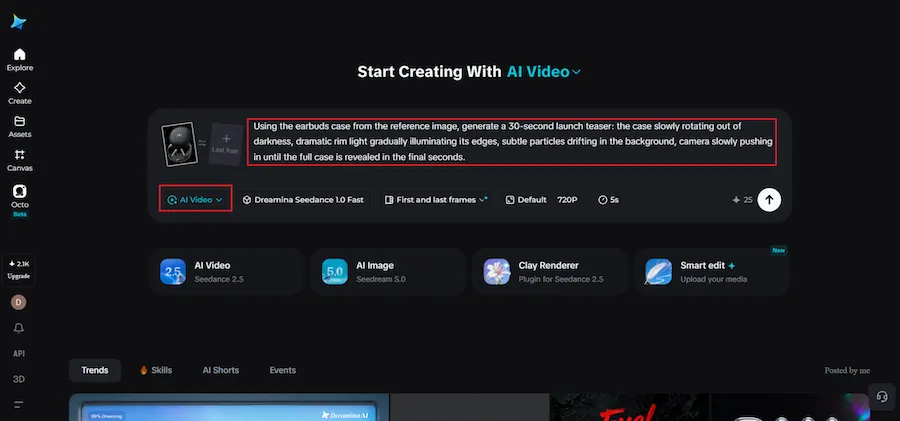
Step 1: Upload your concept image and set the reveal in motion
Sign in to Dreamina and open the "AI Video" section. Click "Add reference image" to upload your product concept photo, then write a prompt describing the reveal you want.
For a 30-second clip, try: Using the earbuds case from the reference image, generate a 30-second launch teaser: the case slowly rotating out of darkness, dramatic rim light gradually illuminating its edges, subtle particles drifting in the background, camera slowly pushing in until the full case is revealed in the final seconds.
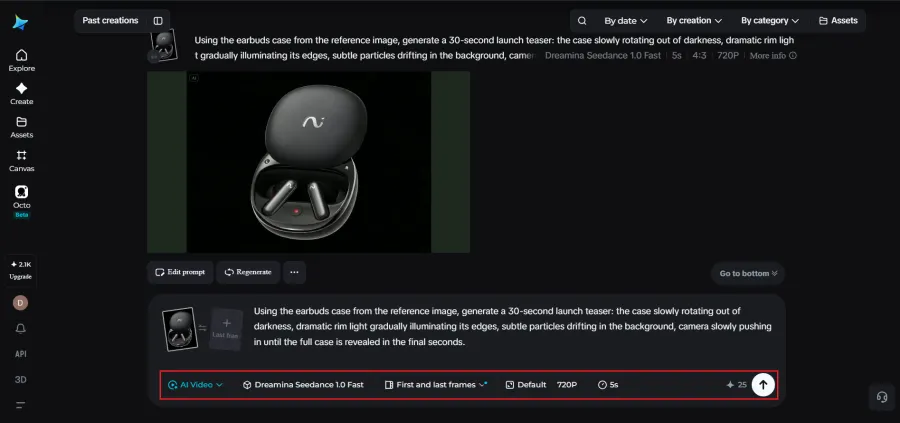
Step 2: Generate the teaser with Seedance 2.5
Select the Seedance 2.5 model, choose your video length, then pick an aspect ratio suited to your platform — 16:9 for YouTube or 9:16 for TikTok. Click Dreamina's generate icon and let the reveal come together.
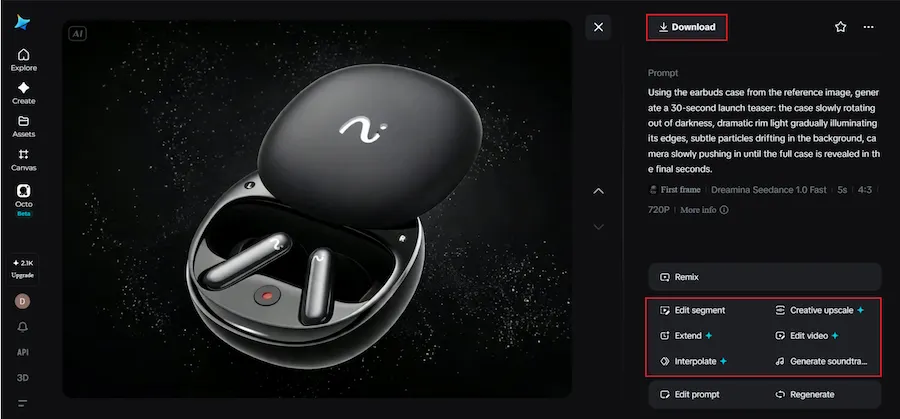
Step 3: Enhance and export your teaser
Polish the finished clip using Dreamina's AI editing tools. Use Upscale for higher resolution or Generate soundtrack for adding audio, then export and share it across social media platforms.
Deciding how much of the product to actually show
A common teaser mistake is revealing too much too soon. The most effective concept teasers often show shape and mood while withholding full detail — a silhouette, a partial angle, a glimpse of texture — leaving the complete design for the actual launch moment.
Inside Seedance 2.5: precision for a product that doesn't exist yet
Realistic light and material behavior
Concept teasers depend heavily on how light interacts with surfaces to suggest premium quality, and Seedance 2.5 has significantly reduced the artificial "AI look" in favor of more physically believable material and lighting behavior.
Longer builds for a fuller sense of anticipation
Native clips now support up to 30 seconds, with the "Ultra-long Video Generation (beta)" mode extending that range up to 180 seconds, giving enough room for a slow reveal to actually feel earned rather than rushed.
Modifying spatial perspective
Seedance 2.5 can adjust camera position based on the original concept image, reasonably extrapolating angles and spatial details not shown in the original reference, which is especially useful for a product that hasn't been physically photographed from every side.
Precise local editing
Local editing lets you remove or adjust specific elements—a, a stray reflection, an unwanted background element—to, to be removed or adjusted without regenerating the entire teaser.
Timing your teaser around the launch calendar
A teaser rarely works as a single, isolated post. Releasing a first glimpse weeks before launch, followed by a slightly more revealing version closer to release, builds a sense of escalating anticipation that a single one-off video can't replicate on its own.
Matching tone to the type of product
A tech product often calls for cool tones, sharp light, and precise camera movement, while a lifestyle or wellness product might suit warmer light and slower, more organic motion. Naming that tone directly in your prompt helps Seedance 2.5 shape the teaser's mood to match the product's actual positioning rather than defaulting to one generic reveal style.
Turning one teaser into a full campaign
A single concept image can support more than one video. Generating a short vertical teaser for social platforms, a slightly longer cut for a landing page, and a close-up detail version for retargeting ads all stem from the same source image, stretching one round of generation into a full pre-launch campaign.
Building anticipation without overpromising
There's a fine line between a teaser that excites and one that sets expectations a real product can't meet. Because a concept teaser is often built before final manufacturing details are locked in, it helps to keep the animated reveal focused on mood, light, and form rather than implying specific features or functionality that haven't been finalized yet.
This keeps the excitement genuine rather than setting up a letdown at launch.
Common mistakes that undercut a teaser's impact
A handful of habits quietly weaken otherwise strong concept teasers:
Showing the complete product too early, removing all sense of mystery
Using generic, unbranded motion that doesn't reflect the product's actual character
Skipping sound design, which leaves an otherwise dramatic reveal feeling flat
Where these launch teasers perform best
Concept teasers work especially well on social media pre-launch campaigns, crowdfunding pages, investor pitch decks, and email announcement sequences, where building genuine curiosity often matters more at this stage than showing complete product detail.
Measuring whether a teaser is actually working
Unlike a finished product ad, a teaser's success is harder to judge by clicks or sales alone. Comments asking what the product actually is, shares from people speculating about the release, and saves for later are often stronger signals that a teaser did its job than direct conversions, since the goal at this stage is curiosity rather than an immediate purchase decision.
Final thought
A product concept was always meant to spark curiosity before it became something people could actually hold. With Dreamina and the anticipation-building precision behind Seedance 2.5, that curiosity can finally be felt in motion, turning a single early image into the opening scene of a launch people are genuinely excited to see.
