
 BTC
BTC
 ETH
ETH
 LTC
LTC
 BCH
BCH
 DOGE
DOGE
 USDT
USDT
 DASH
DASH
 XRP
XRP
 USDC
USDC
 XMR
XMR
 TRX
TRX
 BNB
BNB
 SHIB
SHIB
 DAI
DAI
 ZEC
ZEC
 SOL
SOL
 ETC
ETC
 POL
POL
 XLM
XLM
 ADA
ADA

TradingView has dominated the technical analysis and charting space for years, serving millions of traders and investors worldwide. However, as the financial market evolves and trading activities become more sophisticated, many traders are seeking alternatives to TradingView that better match their specific needs.
Whether you're frustrated with Pine Script's proprietary syntax, need more crypto-focused analysis tools, or want a platform that speaks Python, the search for the best TradingView alternatives has never been more relevant.
Why Traders Are Looking for a TradingView Alternative
The challenge isn't that TradingView lacks features - it's actually one of the most comprehensive platforms for technical and fundamental analysis. The real issue is that different traders have different requirements. Forex traders might need specialized forex market tools, while crypto enthusiasts want multi-exchange data. Python developers don't want to learn another proprietary language just to build custom indicators. And institutional analysts need enterprise-grade customization that goes beyond standard charting tools.
What Makes a Good Alternative to TradingView?
Before diving into specific platforms, let's establish what serious traders look for when evaluating TradingView alternatives. The best alternative to TradingView isn't necessarily the one with the most features - it's the one that aligns with your trading strategies and technical requirements.
Key criteria include:
- Charting capabilities: Advanced charting with customizable charts and multiple timeframes
- Technical indicators: A robust library of indicators plus the ability to create custom ones
- Market coverage: Access to stock, crypto, and other asset class data with real-time data feeds
- Analysis tools: Both technical analysis tools and fundamental analysis capabilities
- Customization: The ability to adapt the platform to your specific trading style
- Pricing: A viable free version or reasonable subscription for active traders
For developers and algo traders, there's an additional requirement that TradingView addresses through Pine Script: the ability to code custom indicators and automated technical analysis. This is where the landscape gets interesting - and where platforms like TakeProfit.com, TrendSpider, and others differentiate themselves.
Top TradingView Alternatives: A Market Overview
Best TradingView Alternatives for Different Trading Needs
The trading platform ecosystem offers several alternatives worth considering, each excelling in different areas:
TrendSpider stands out for automated technical analysis and advanced backtesting capabilities. This platform uses AI to identify patterns and provide market analysis without manual chart drawing. TrendSpider offers powerful backtesting tools and multi-timeframe analysis, making it popular among swing traders who need serious backtesting for their trading systems.
Koyfin provides institutional-grade financial analysis with deep fundamental and technical analysis. Koyfin excels at financial data visualization and offers comprehensive features for market data analysis across desktop and mobile platforms. While not as strong on charting options as TradingView, Koyfin provides superior analytics for traders and investors who prioritize fundamental analysis alongside their technical work.
MetaTrader (MT4/MT5) remains the gold standard for forex traders, offering advanced features for forex trading and automated trading through Expert Advisors. The platform for forex market participants includes extensive backtesting capabilities and connects directly to many brokerage services. MetaTrader's strength lies in its execution capabilities and deep forex market integration.
FinViz serves as an excellent screener and market analysis tool, particularly for stock analysis. While its charting platform capabilities are more basic, FinViz excels at helping traders identify market trends across thousands of stocks through powerful filtering designed for traders.
Investing.com offers comprehensive market data across multiple asset classes with a robust free plan. It's particularly strong for traders who need global coverage and real-time data across stocks, forex, and crypto prices.
GoCharting provides an intuitive interface similar to TradingView with strong customization options for Indian markets, making it a solid charting and analysis platform for regional traders.
The Pine Script Problem: Why Developers Need an Alternative
While these platforms address various trading needs, there's a specific gap that affects Python developers and programmers: the challenge of creating custom indicators without learning proprietary languages.
TradingView offers Pine Script - a powerful but proprietary scripting language for building indicators and trading strategies. For the millions of Python developers worldwide, this creates a barrier. Why learn an entirely new syntax when you already know Python? Why can't technical analysis be as accessible as any other programming task?
Beyond Syntax: The Growing Cost Barrier
The challenges with TradingView extend beyond just learning a new language. Many traders report frustration with escalating subscription costs and features being moved behind paywalls. What was once included in basic plans now requires premium subscriptions - custom indicator alerts, multiple chart layouts, and advanced features increasingly require expensive tier upgrades.
The platform's customer support has also become a pain point for many users, with reported response times stretching weeks or months for technical issues. For developers building custom Pine Script indicators, moderation policies can be inconsistent, with scripts sometimes rejected without clear explanation or recourse.
Additionally, some users have noted concerns about data reliability and alert functionality - critical issues when your trading decisions depend on accurate, real-time information. When alerts fail to trigger or save correctly, or when execution behaves unpredictably, it undermines confidence in the entire platform.
The Case for an Open Alternative
This is where TakeProfit's Indie trading language enters as a specialized TradingView alternative - not to replace TradingView entirely, but to offer Python developers a familiar path to building custom trading tools without the proprietary lock-in or escalating costs.
With a straightforward free plan and transparent pricing, Indie language focuses on what developers actually need: a reliable environment to build and deploy custom indicators using skills they already have. No proprietary language to master. No unclear moderation policies. Just Python and your trading ideas.
Introducing Indie: Python Meets Technical Analysis
Indie Script is a Python-based programming language designed specifically for creating custom technical indicators on the TakeProfit platform. Unlike TradingView's Pine Script or the complex setup required for MetaTrader's Expert Advisors, Indie lets you leverage your existing Python knowledge to build sophisticated analysis tools for crypto and financial markets.
Think of it as "Pine Script, but in Python." If you've ever written Python code, you already know 80% of what you need to create custom indicators. No proprietary syntax to memorize. No frustrating language quirks, just smooth development of technical analysis and trading tools. Just clean, type-safe Python with specialized decorators for trading analysis.
The Python Advantage for Traders
For developers and quantitative analysts, the choice of programming language matters, especially when it comes to building powerful charts for trading skills. Python has become the lingua franca of data science, AI, and financial analysis. When you build indicators in Indie, you're using a language you already understand - complete with familiar concepts like type hints, decorators, and object-oriented programming.
Key advantages of the Python-based approach:
- Zero learning curve for Python developers: Start building indicators on day one without language documentation
- Type safety: Catch errors before they affect your trading decisions with strict type hints
- Clean syntax is essential for creating powerful charts efficiently.: Write maintainable code that's easy to understand and modify
- Modern architecture: Use decorators like @indicator alert and @algorithm for elegant, modular design
- Familiar tooling: Leverage your existing Python knowledge and development practices
Crypto-Native Design for Modern Markets
While platforms like TradingView offers broad market coverage and FinViz excels at stock screeners, Indie Script takes a different approach: it's purpose-built for cryptocurrency markets. This crypto-first design means you get features that generic platforms treat as afterthoughts.
The platform provides multi-exchange data integration, allowing you to analyze crypto prices across Binance, Coinbase, Kraken, and other major exchanges simultaneously. Volume analysis - critical for crypto trading - is built into the core architecture. You can create indicators that track trading volume patterns, detect whale movements, and identify liquidity shifts across different trading venues.
For active traders in the crypto market, this specialization matters. You don't need to worry about whether your forex tester online supports Bitcoin or if your charting tools can handle 24/7 crypto trading hours. Indie Script is designed from the ground up for the always-on, multi-exchange reality of cryptocurrency markets.
What You Can Build with Indie Script
Custom Indicators Without the Complexity
The primary use case for Indie is creating custom technical indicators - and it excels at this. The platform includes over 60 built-in algorithms for common indicators like SMA, EMA, RSI, MACD, Bollinger Bands, and more, all designed for traders. But the real power comes when you need something unique, like alerts for specific market trends.
Creating a custom indicator is straightforward:
You define your logic using Python, wrap it with the @indicator decorator, and the platform handles the rest. Want to combine RSI with volume analysis and multi-timeframe trend detection to enhance your technical analysis and trading? Build it in minutes, not hours. Need to visualize complex market data with dynamic colors and custom markers? The plotting system gives you full control.
The @algorithm Decorator lets you create reusable components - think of them as indicator building blocks for powerful charts. Once you've built a custom calculation method, you can reuse it across multiple indicators or share it with your team. This modularity makes Indie Script particularly powerful for institutional analysts and trading teams who need consistent, maintainable analysis tools across multiple charts.
Advanced Visualization and Analysis Tools
Good charting isn't just about plotting lines - it's about presenting information in ways that support better trading decisions. Indie Script provides sophisticated visualization capabilities that rival dedicated charting platforms.
You can create multi-colored plot lines that change based on market conditions, add fills between indicator lines to highlight zones, place dynamic labels and markers on specific bars, and build custom histogram visualizations for volume or momentum analysis. The platform supports both series-based plotting (lines that follow time) and non-series drawings (labels and shapes at specific locations).
For traders who need advanced technical analysis, Indie Script supports multi-timeframe indicators - analyze daily trends while trading on hourly charts. The @sec_context decorator enables cross-instrument analysis, letting you compare Bitcoin movements across exchanges or track correlation between different crypto assets.
Real-World Trading Applications
Practical use cases for Indie include:
- Volatility analysis: Build custom ATR-based indicators that adapt to crypto market volatility patterns
- Volume profiling: Create sophisticated volume analysis tools that detect institutional activity
- Multi-exchange arbitrage indicators: Track price discrepancies across trading venues in real-time
- Trend confirmation systems: Combine multiple technical indicators with custom weighting
- Market microstructure analysis: Analyze order book dynamics and trade flow patterns
- Risk management tools: Develop position sizing calculators based on volatility and market conditions
The platform is particularly valuable for quantitative researchers who need to rapidly prototype trading ideas using powerful charts. Instead of dealing with data pipelines and visualization libraries separately, you get an integrated environment where your Python code immediately appears on live charts with real-time data.
Understanding the Trade-offs: Is TakeProfit & Indie Right for You?
Like any specialized tool, Indie Script excels in specific areas while making conscious trade-offs in others. Understanding these limitations is crucial for making the right platform choice for your trading activities.
What Indie Script Offers
For Python developers entering algorithmic trading, Indie Script removes the biggest barrier: learning a proprietary language. You can build professional-grade indicators using skills you already have. The type-safe environment catches errors early, and the decorator-based architecture keeps code clean and maintainable.
For crypto-focused traders, the platform's multi-exchange data and crypto-native design provide analysis capabilities that generic platforms treat as add-ons. Real-time data across major exchanges, volume-weighted calculations, and 24/7 market support come standard.
For teams and institutions, the Python foundation means easier code reviews, better collaboration, and integration with existing data science workflows. Your quantitative analysts can build indicators using the same language they use for backtesting and research.
The Ideal Indie Script User
You should choose Indie Script if you:
- Are a Python developer who wants to build custom indicators without learning Pine Script
- Trade cryptocurrencies and need multi-exchange analysis tools
- Value type-safe, maintainable code over a massive community library
- Need rapid prototyping of custom technical analysis ideas
- Want modern development practices applied to trading tools
- Prefer quality and specialization over breadth of features
Consider other platforms if you:
- Need comprehensive backtesting capabilities for strategy development to enhance your trading skills?
- Primarily trade stocks, forex, or futures rather than crypto
- Want extensive paper trading and simulation tools
- Need the massive community and script library that TradingView provides
- Require fundamental analysis tools alongside technical indicators
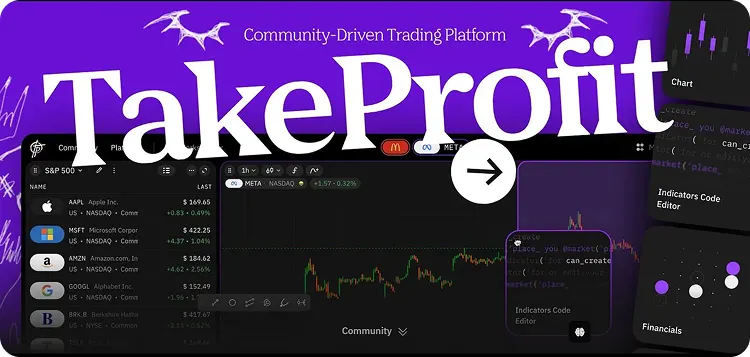
Getting Started with Indie Script
The setup process is remarkably straightforward - you can go from zero to your first custom indicator in under five minutes.
Step 1: Access TakeProfit
Visit the TakeProfit platform and create a free account. No credit card required, no complex brokerage integration. The free version gives you full access to the code editor and charting capabilities.
Step 2: Add the Code Editor Widget
In your workspace, add the "Indicators Code Editor" widget from the More Widgets menu. This gives you a full-featured Python IDE right in your browser, complete with syntax highlighting and error checking.
Step 3: Write Your First Indicator
Start with the simple template provided. Even a basic indicator that plots closing prices teaches you the fundamental structure. From there, explore the 60+ built-in algorithms in the library reference.
Step 4: Deploy to Charts
Click "Add to Chart" and watch your code transform into a live indicator on real-time crypto data. Adjust parameters, modify colors, and see changes instantly.
The official documentation provides comprehensive guides, from quick-start tutorials to advanced techniques. The library reference documents every function, and example indicators demonstrate best practices for everything from basic plotting to complex multi-timeframe technical analysis and trading.
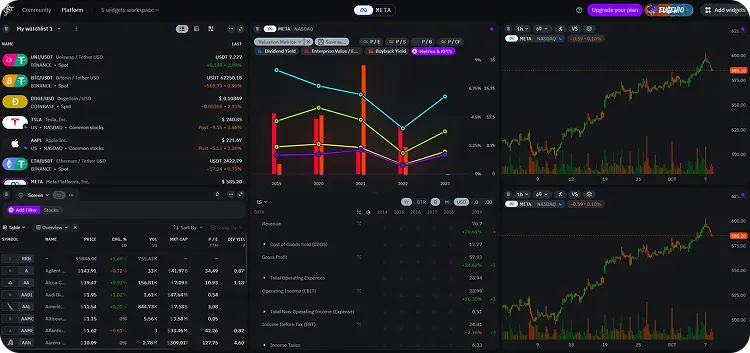
Ready to build your first Python-based trading indicator? Visit TakeProfit, open the code editor, and discover how familiar Python syntax can transform your technical analysis workflow. For developers who've always wanted to automate their trading ideas without learning a proprietary language, your alternative to TradingView is here.
