
 BTC
BTC
 ETH
ETH
 LTC
LTC
 BCH
BCH
 DOGE
DOGE
 USDT
USDT
 DASH
DASH
 XRP
XRP
 USDC
USDC
 XMR
XMR
 BNB
BNB
 TRX
TRX
 SHIB
SHIB
 DAI
DAI
 ZEC
ZEC
 SOL
SOL
 ETC
ETC
 POL
POL
 XLM
XLM
 ADA
ADA

Finding merchants that accept crypto should be simple in theory, yet most people hit the same wall: endless lists with little guidance on how to actually pay. The real challenge isn’t just discovering a crypto-friendly entertainment site — it’s navigating the full journey from filtering options to sending a transaction, avoiding network mistakes, and confirming payment correctly.
This article solves that by breaking down the end-to-end process using real platform examples. Tools like Cryptwerk will be used as a practical case to show how discovery works in action, but the steps, checks, and workflows you’ll learn can be applied to any directory, marketplace, or merchant you choose in the future.
Start with discovery: using Cryptwerk effectively
Cryptwerk isn’t just a directory. It’s a structured search tool with filters that let you narrow options by category, coin, and location. Start on the homepage and choose a category such as Entertainment or Online Services if you want crypto-friendly entertainment sites. Then apply the coin filters. Each merchant displays coin badges (BTC, ETH, USDT, etc.), making it easy to scan compatibility before clicking through.
To avoid dead ends, check when the listing was last updated. If a merchant hasn’t been verified recently, open their website in a new tab and confirm their crypto payment page still exists.
Some stores only accept crypto for certain regions or specific purchase types. Cryptwerk also includes a map view so you can locate physical stores if you want to learn how to pay with Bitcoin at stores in your area. Many merchants generate a new deposit address per checkout session, so always start a fresh order rather than saving old addresses.
Wallet readiness before any checkout attempt
Before paying, make sure your wallet is prepared. This single step prevents the majority of failed transactions. Confirm the following:
- You hold the exact coin the merchant supports.
- You have enough to cover the item plus network fees.
- Your wallet allows custom network settings, since some merchants require specific chains (e.g. USDT on TRON instead of Ethereum).
- You know how to send a manual transaction — many first-time spenders struggle here.
Once you’ve filtered for a merchant and verified coin support, you’re close to paying. However, clarity from the merchant matters. Payment pages should explain the address format, timing expectations, and required confirmations.
As an example, suppose you are gambling at Cafe Casino; you’ll be able to find a list of supported coins and straightforward steps to help you get started with this. This kind of transparent deposit flow is what users should look for when gambling crypto at Cafe Casino, or any other entertainment platform, because it reduces uncertainty and builds confidence in the payment process. Cafe Casino has lots of crypto-compatible games, offering a varied and interesting experience for players from all walks of life. Whether you prefer table games, slots, or dice options, you’ll find a good selection, and this can be a great way to get hands-on experience with paying using crypto.
Timing matters: why test transactions help
Crypto payments are not always instant. Depending on the coin, confirmation speed varies. A small test transaction helps you understand the network load before sending the full amount.
It’s also worth thinking about whether you’re playing during a peak promotional period or when a special offer is running, as this may affect the typical user behavior on a site.
One example is this Instagram post from Cafe Casino:
https://www.instagram.com/p/DPgsJleDdIH/
In the video, the platform promotes a limited-time NFL-themed slot event with generous prizes, hype visuals, and fast-cut animations. These kinds of promos are designed to trigger immediate player engagement, which means a surge in logins, deposits, and withdrawals all within a short window.
When thousands of users decide to try crypto during a hype moment, blockchain traffic increases and internal processing queues grow. The post highlights exactly how marketing events can unintentionally create network congestion and longer confirmation waits behind the scenes.
For the user, the lesson is clear: if you plan to pay with crypto during a promo or event window, first send a small test transaction to check real-time speed. This lets you verify the address, measure confirmation times, and avoid stress if the full deposit is delayed.
Confirmation expectations by coin
Confirmations can vary depending on the coin you use, but this table may help:
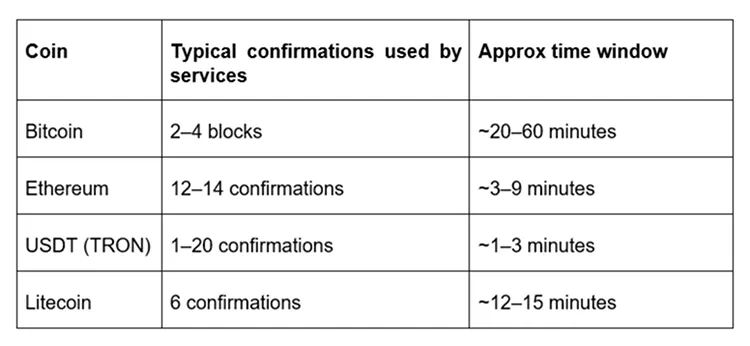
Some entertainment sites credit after zero-confirmation for speed, but the majority wait for at least one or two. Always check their policy in advance.
Pre-checkout checklist
- Confirm coin support in Cryptwerk listing and merchant page
- Open merchant payment instructions
- Prepare correct wallet and network
- Test send an optional small amount
- Disable VPN if it interferes with wallet connection
- Note confirmation policy (instant versus delayed credit)
During checkout checklist
- Paste address — never type manually
- Double-check characters at start and end
- Confirm network fees are sufficient
- Send and wait without refreshing repeatedly
- Screenshot or copy transaction hash
Post-payment verification checklist
- Match merchant “pending” status to blockchain confirmation
- Monitor block explorer using transaction hash
- If credit is delayed beyond policy, contact support with hash
- Save proof until service or goods are delivered
Troubleshooting common scenarios
Payment shows sent but not received
Check if you used the correct network. For example, sending USDT-ERC20 to a USDT-TRC20 address will fail.
Wallet says confirmed but merchant is still pending
Some platforms batch deposits or wait for additional confirmations before crediting balances, which can extend the pending time. Be patient and read up on their stated confirmation policy.
Merchant shows expired address
Start the process again. Many sites generate a new deposit address per session. Never reuse old ones.
Beyond checkout: staying operationally smart
Entertainment merchants often introduce internal balances or wallet systems. Always understand whether crypto goes directly to the service or first into an account credit. Some platforms convert crypto to fiat instantly, while others keep it on-chain. Building up your understanding before you start playing is key.
